Community
Outer Space is shared: every pilot flies in the same world, hunts the same 12 Keys and shapes the same next Cycle. Community features give pilots a place to gather and a say in what happens.
| Part | What it does |
|---|---|
| Squares | Player-run communities with chat, announcements, members and moderation |
| Chat & Emotes | Talk to nearby pilots or everyone in Outer Space, and react with emotes |
| Voting | Key holders vote onchain on ecosystem projects |
| User Mod | Pilots design the next Cycle's world and vote for their favorite |
| Ecosystem | Pilots comment on projects, mark them safe and report scams |
Alerts
Alerts in the menu on the right opens your Notifications: account alerts such as a ban from a Square, with Mark read and Mark all read. A badge on the menu shows when there's something new.
Square activity, such as new announcements and approved join requests, appears in the Squares menu instead.
Activity feed
The feed at the top right of the screen shows what's happening around you: kills and downs of nearby pilots, and every Key found in the Cycle. Change what it shows in Settings → Graphics.
Square sites
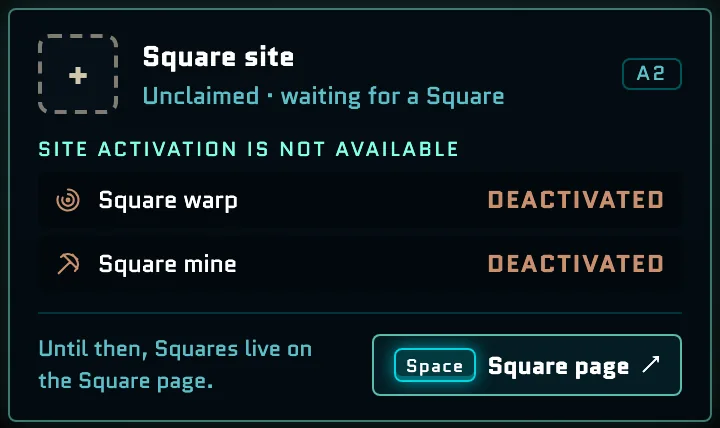
Small Square sites are scattered across the map, one by the Core Zone and more in the outer Zones. They aren't active: each site reads Unclaimed · waiting for a Square and "Site activation is not available", and its Square warp and Square mine are deactivated, so they offer no travel or token rewards.
- Hold Space over the site's central shaft to enter the Square space: a plaza with a notice board that reads "SQUARE ACTIVATION IS NOT AVAILABLE", conduits marked NOT CONNECTED and vacant member plots. Hold Space on the central lift, or select Return, to fly out again.
- Hold Space elsewhere on the site, or select Square page ↗, to open the Squares menu.