Rewards
Most of what you earn in Outer Space waits in your Rewards menu until you claim it to your wallet. This page explains where rewards come from, how to claim them and how to keep track of your AIR.
Where rewards come from
| Source | What you get | Learn more |
|---|---|---|
| Mines | AIR for each Extractor run. A full 10-minute run currently mines 90 AIR. | Mining |
| Capsules | One refill per Capsule: Bullet Ammo, a Booster Charge or, rarely, Bomb Ammo | Capsules |
| Keys | A Key for the current Season and Cycle, such as "S3C6 Key", plus the AIR reward per Key shown in the Cycle view | Keys |
| Enemies | Sometimes AIR coins, ammo or booster charges | Combat & Gear |
| Ranked games | AIR for the top 10 pilots in each game, after each Cycle is reviewed | Mini-games |
| User Mod | Creators of an adopted Mod earn 10% of the AIR spent in shops while it runs | User Mod |
Rewards from Mines, Keys, enemy AIR coins and Ranked games arrive as unclaimed rewards in the Rewards menu. Refills you pick up from Capsules and enemies go straight into your Cargo and don't need to be claimed. User Mod creator rewards are claimed in User Mod → My Mods → Rewards. Poker and Gravity Duel don't pay rewards.
Claim within 72 hours
Rewards in the Rewards menu expire 72 hours after you earn them, and expired rewards can't be claimed. A Key reward also has to be claimed before the Cycle you found it in ends. Its countdown shows whichever deadline comes first, and once the Cycle ends, the Key and its AIR move to History as Cycle ended.
How to claim rewards
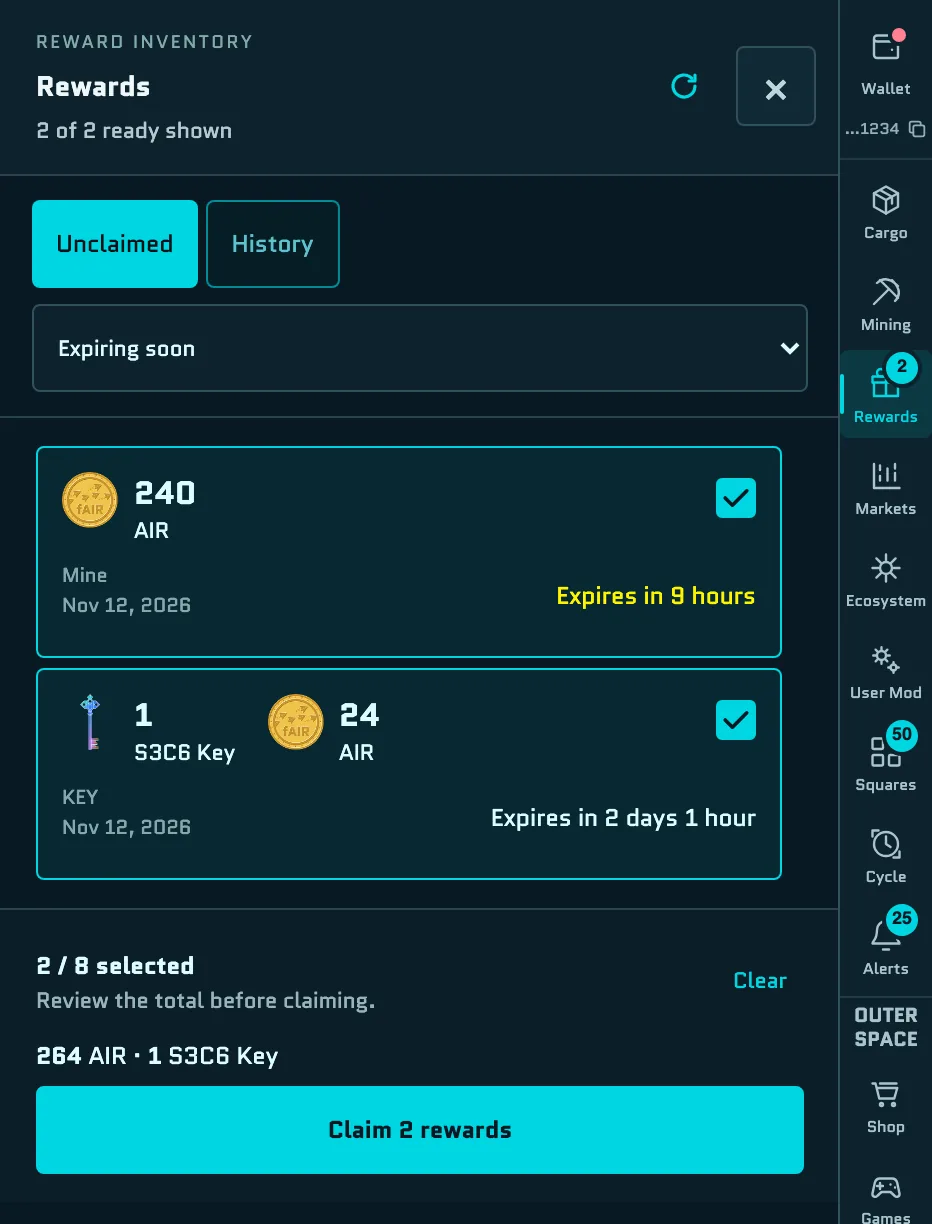
- Open Rewards in the menu on the right. A badge shows how many rewards are ready to claim.
- On the Unclaimed tab, select the rewards you want to claim, up to 8 at a time. Each reward shows its source, its amount and when it expires.
- Sort by Expiring soon or Newest first.
- Select earliest (or Select shown when sorted by newest) picks up to 8 ready rewards for you. Clear deselects them.
- Check the total at the bottom of the panel, then select Claim N rewards.
- Confirm the transaction in your wallet. If your wallet asks, switch to Hyperliquid EVM Testnet (chain ID 998). One transaction claims all the rewards you selected, and you pay a small gas fee in HYPE.
- The panel shows the progress from Wallet to Confirmation to Complete, then "N rewards claimed." Your AIR balance updates next to your name, and claimed Keys are recorded onchain under your wallet.
You can switch to other menus while a claim confirms. To claim more than 8 rewards, repeat the steps. If you have many rewards, select Find more ready or Load older rewards to see the rest, because only rewards loaded in the list can be selected.
Claim history
- The History tab in Rewards lists claimed and expired rewards, with a link to each claim's transaction.
- Wallet → Transactions shows each claim transaction and its status. See Transaction history.
- Wallet → AIR Activity shows the AIR you've earned, spent and can still claim, filtered by Cycle and by source. See AIR Activity.
If a claim doesn't go through
| Message | What to do |
|---|---|
| "Choose up to 8 rewards. Clear one to select another." | Deselect a reward, or claim in several batches. |
| "Reconnect the wallet you used to sign in to claim rewards." | Select Connect wallet and reconnect the wallet you signed in with. |
| "Switch the wallet to Hyperliquid (chain 998)." | Approve the network switch in your wallet. |
| "The connected wallet does not have enough funds for this transaction." | You need a little HYPE for gas. See Get testnet HYPE. |
| "Another reward claim is in progress." or "The transaction was submitted. Refresh to check its status before another claim." | Wait for the current claim to finish, then refresh the list. |
Spending AIR
Claimed AIR sits in your wallet, ready to spend:
- Shop: heals, ammo, booster charges, Wormhole Tickets and equipment. See Shop & Wormholes.
- User Mod: items in Mod Shops, and the 50 AIR fee to submit a candidate. See User Mod.
- Tie-break votes: 100 AIR for one extra vote. See Voting.
Game Tickets for Ranked runs are bought with USDC, not AIR. Every payment is a wallet transaction. Payments for Shop and Mod Shop items, Game Tickets, User Mod submissions and tie-break votes go to the Spacebar Vault.