Markets
Outer Space brings live Hyperliquid market data into the game: spot, perps (including HIP-3 markets) and HIP-4 outcome markets. You can follow markets while you fly, pin favorites, open a market's details in a single click and trade Spot and Perps markets on Hyperliquid testnet without leaving the game.
Markets menu
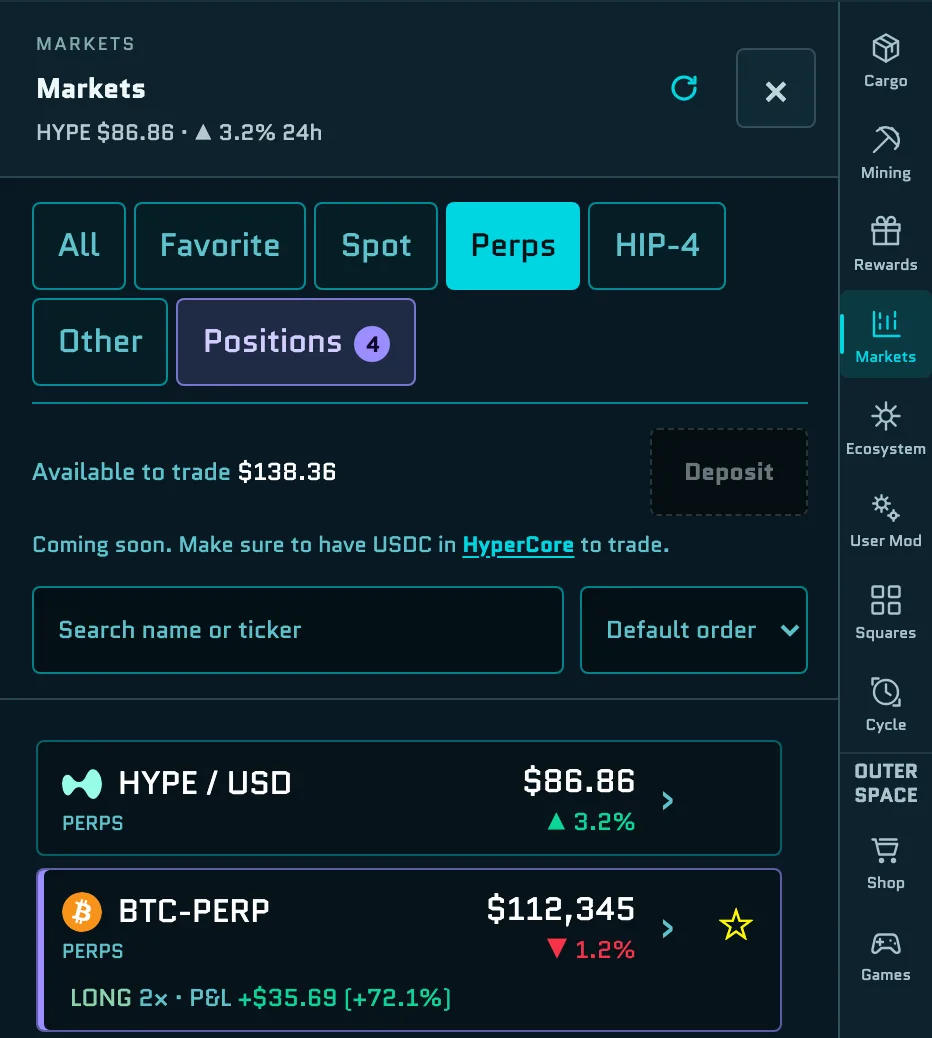
Open Markets in the menu on the right. The tabs are All, Favorite, Spot, Perps, HIP-4 and Other. HIP-3 markets are listed under Perps. While you hold something in your trading account, a Positions tab appears too.
- Each row shows the market, its type and its price with the 24-hour change. HIP-4 outcome markets show the leading outcome's probability instead. Markets you hold are marked with your position, such as LONG 2× and its P&L.
- Search with Search name or ticker, and sort by Default order or Name A–Z. In the default order, a HYPE / USD row comes first on most tabs.
- Select ☆ to add a market to your favorites.
- Select a row to open its details, with a price chart, the order book and live stats.
Under the tabs, Available to trade shows the USDC you can trade with. Deposit isn't available inside Outer Space yet; select HyperCore to open your portfolio on Hyperliquid testnet and add test USDC there. See Get test USDC for trading.
Market details
If you hold the market, a card under the price shows your position: its order value, entry and current price, and its liquidation price, take profit and stop loss. Its buttons are Sell or Close, and TP/SL.
At the bottom, Trade opens the order sheet, and Open on Hyperliquid ↗ opens the market on Hyperliquid's own site after you confirm that you're leaving Outer Space. When a market can't be traded in the game, the button explains why:
| Message | Why |
|---|---|
| Not on Hyperliquid testnet | The market doesn't exist on testnet. This applies to every HIP-3 market. |
| Trading is halted | Hyperliquid has halted the market. |
| Pays in …, not USDC | The Spot market is quoted in another token. Only USDC markets can be traded. |
| Live price unavailable | There's no live price to trade at right now. |
Trading HIP-4 outcome markets is marked Coming soon.
Positions
The Positions tab lists your open perp positions and the Spot tokens in your trading account, with how many you hold and your total P&L. Select one to open its market.
Trade in the game
You can buy and sell Spot tokens and open Perps positions right from the Markets menu. Trades go to Hyperliquid testnet and use test USDC, so no real money is involved.
Your ship keeps flying
Your ship keeps flying and can take damage while you trade. Park somewhere safe, such as the Core Zone, before you open the order sheet.
Enable trading
The first time you select Trade, the order sheet checks your account and asks you to Enable trading. Select it and sign in your wallet, usually twice:
- Register this browser's trading key. The key lets this browser sign your orders, so trades don't open wallet pop-ups after this.
- Approve Spacebar's trading fee. See Fees.
Signing costs no gas, and no funds move. If your Hyperliquid account keeps separate balances for Spot and Perps, enabling also sets it to one USDC balance for every market. The trading key is kept in this browser, so you enable trading again in another browser or on another device.
If you have less than $10 available and nothing to sell or close, the sheet shows Orders start at $10 instead. Add test USDC first.
Place an order
Every order is a market order of at least $10.
- Spot: choose Buy or Sell. To buy, set the Size with the slider or Max; the sheet shows what You get, the Avg price and the Fee. To sell, choose the Share of your holding.
- Perps: choose ▲ Long or ▼ Short, set the size, then the Leverage: from 1× up to 10× (or the market's maximum, if that's lower), starting at 2×. Positions use isolated margin. The sheet shows the Order value, the Liquidation price, your Max loss and the Fee, and warns you at high leverage. To add a take profit or stop loss, select + Take profit / Stop loss and set each as a percentage of your Size.
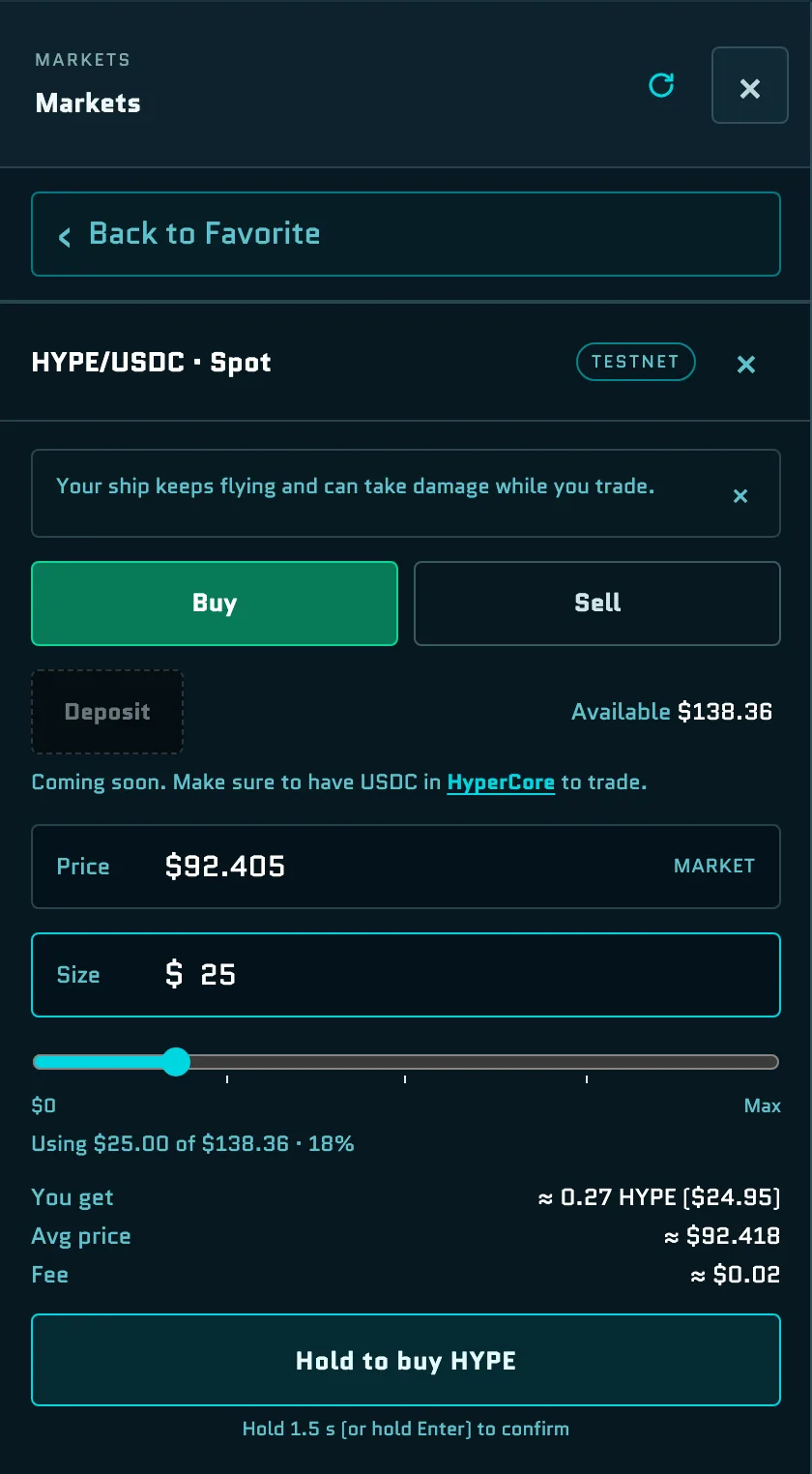
To confirm, hold the button, such as Hold to buy HYPE or Hold to long BTC 2×, for 1.5 seconds. You can also hold Enter. If you let go too early, the button says Keep holding. When the order goes through, the sheet closes and a message confirms the trade. If the price moves and only part of the order fills, the message tells you how much was filled; the rest is canceled.
Manage positions
From a market's details or the Positions tab:
- Close a perp position, all of it or a share. The sheet shows what You get back.
- Sell Spot tokens. Holdings worth less than $10 can't be sold here.
- TP/SL sets or changes a position's take profit and stop loss.
A message also tells you when a position ends on its own: when it hits its take profit or stop loss, or when it's liquidated.
Fees
Hyperliquid charges its usual trading fees. Spacebar adds its own fee, currently 0.02%, to every order except Spot buys. The Fee line in the order sheet shows the total before you confirm.
Get test USDC for trading
Trading uses the test USDC in your Hyperliquid testnet account, which is what Hyperliquid's testnet faucet gives you. It isn't the same as the USDC on HyperEVM testnet that pays for Game Tickets. See Get testnet USDC.
Testnet prices
The prices on screen come from Hyperliquid mainnet, but your orders fill on Hyperliquid testnet's own order books. The price you get can be very different from the mainnet price shown above the order sheet.
HIP-4 outcome markets
The HIP-4 tab is split into Crypto, Sports, Economics and Tradfi, each showing the top 10 markets by 24-hour volume. Each row shows the market's rank and deployer, the question, the leading outcome and its probability, the 24-hour volume and when the market closes.
Instead of favorites, you can Pin market to keep up to five HIP-4 markets at hand for this session. Pinned markets appear in the menu on the right as P1 to P5.
Favorites strip
Your favorites appear in a thin strip at the top of the screen with their live prices. If they don't all fit, the rest are under +N. A favorite that moves sharply jumps to the front. Select ☆ + to choose favorites, or select a quote to open its details.
↕ Moves opens Price moves: markets that have moved at least 5% in about five minutes, with moves of 10% or more marked as sharp. It's split into your favorites and other markets.
Market portals
Markets also appear in the world as portals. Price portals show a market's price and recent change, and HIP-4 portals show its YES/NO odds.
- In the Core Zone: up to two market portals near the top of the Core, one price market and one outcome market.
- Along your route: after every one to two minutes of active flight, a market portal appears on your path. Up to two can be out at once, and each one leaves once you've passed it, flown far away or about three minutes have gone by. Your favorites and markets you hold, markets that are moving fast, outcome markets that close within the hour and the busiest markets are the most likely to appear.
Fly into a market portal and hold Space for 1.5 seconds, or click it, to open that market's price details. Trade there opens the market in the Markets menu with the order sheet. Each portal says why it's there, such as YOUR FAVORITES, MARKET HIGHLIGHT or ALONG YOUR ROUTE, with tags like SURGE, DROP or CLOSING SOON.
Your mainnet positions. When your wallet is connected, portals also read your own positions on Hyperliquid mainnet, read-only. A portal for a market you hold can show YOUR LONG or YOUR SHORT, your return on equity, how close you are to liquidation or LIQUIDATED. Only you see this.
Where the data comes from
- Prices and market stats come from Hyperliquid mainnet, so they're real even though Outer Space runs on testnet.
- Your trading account lives on Hyperliquid testnet: Available to trade, the Positions tab, your orders and the prices they fill at.
- Market portals read your positions on Hyperliquid mainnet, read-only.