Voting
Voting is how Key holders take part in governance. If you found a Key this Cycle, you can vote onchain for projects in the Hyperliquid ecosystem.
Why Keys?
In Outer Space, the right to vote is earned by playing, not bought with tokens. To find a Key you have to explore the map and beat other pilots to it, so every voter is someone who's actively involved in the State.
Every vote is recorded onchain, and the results are public. Voting doesn't move your Key out of your wallet.
Who can vote
- You need a Key from the current Season and Cycle, claimed to your wallet. Keys from earlier Cycles can't vote in the general vote.
- Each Key gives you one vote in each category.
- Claim your Key from the Rewards menu first, before the Cycle ends. See Rewards.
What you vote on
You vote for projects from the Ecosystem directory. Projects are grouped into categories, and the Voting window always shows the current ones.
Open Voting
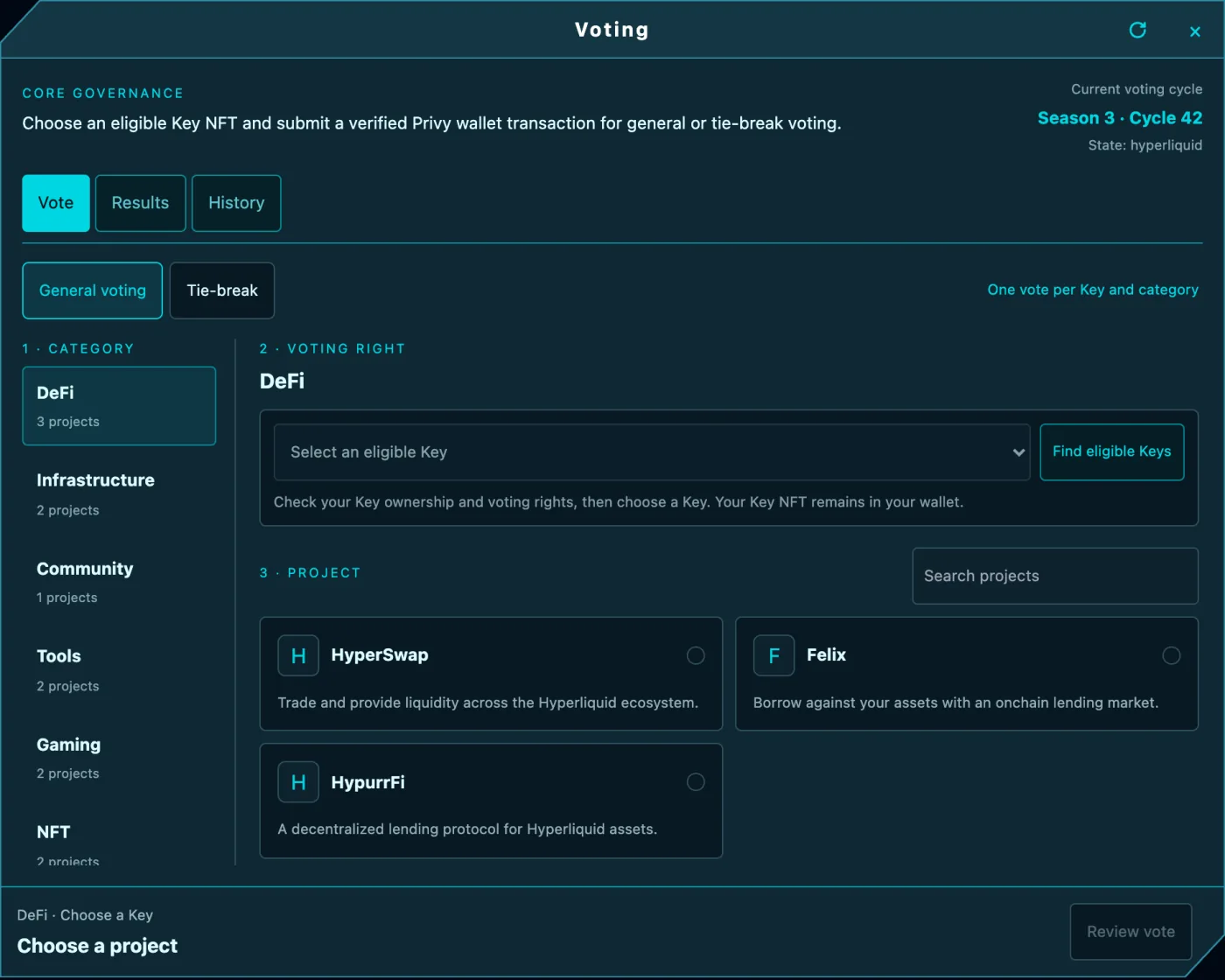
Voting opens in a window inside the game, titled Voting with CORE GOVERNANCE under it:
- Fly to the Voting portal in the Core Zone and hold Space, or click it.
- In the Cycle view, select Open Voting.
- Or go to testnet.spacebar.xyz/hyperliquid/voting, which opens the game with the Voting window.
The window has three tabs: Vote, Results and History.
How to vote
- On the Vote tab, make sure General voting is selected.
- Category: choose a category.
- Voting right: select Find eligible Keys, then choose a Key in Select an eligible Key.
- Project: choose a project. You can search the list.
- Select Review vote, check the summary, then select Submit vote and confirm the transaction in your wallet. Voting costs only gas, paid in HYPE.
While the vote confirms, you'll see "Confirming your vote… You can close this popup." When it's done, Vote confirmed shows the transaction with Copy transaction hash and View transaction ↗. If none of your Keys can vote in that category, the window says "No unspent Key is eligible for this category."
Tie-breaks
When projects are tied, a tie-break opens for that category. Select Tie-break next to General voting on the Vote tab; only the tied projects appear. Tie-break rights are separate from general voting rights, and the window shows which Season and Cycle the tie-break is for. You can vote in a tie-break in two ways:
- Key vote: vote with one of your Keys, as in a normal vote.
- 100 AIR vote: cast one extra vote per wallet in each category for 100 AIR. Select Check AIR vote to see whether you can. If your wallet hasn't approved 100 AIR for voting, the button reads Approve 100 AIR and vote.
When there's nothing to break, the tab shows Tie-break is not active.
Results
- Results shows Current vote results for general voting, with a category filter.
- History shows recent votes from this Cycle by every pilot, with their pilot name and Key.
Because every vote is an onchain transaction, anyone can verify the results.
Voting on User Mod is different
Choosing the next User Mod is a separate, free vote. Every pilot gets one User Mod vote per Cycle, and no Key is needed.