User Mod
User Mod lets the community decide what the next Cycle of Outer Space looks like. Any pilot can design a version of the map, called a candidate. Pilots vote, and the winning candidate runs as the official version for the next Cycle. Its creator earns 10% of the AIR spent in shops while it runs.
Open User Mod with User Mod in the menu on the right while you're in Outer Space, or fly into the User Mod Outerspace portal in the Core Zone. It isn't available from your Backspace room or the Square space. The map of the State takes over the screen, and the menu changes to Candidates, My Mods and Return. To fly again, select Return or BACK TO SPACE, or press Esc when no panel is open.
What a candidate changes
| Layer | What you set |
|---|---|
| Zones | Each Zone's trait: Fire, Water, Plant, No Trait or Cycle default, which keeps the trait the Cycle gives that Zone. Zones in rings B to J can be edited; the Core Zone is locked. |
| Enemies | Voidling swarms (×6) and Leviathans, up to 100 per candidate. Enemies take the trait of the Zone they're in. |
| Shops | Up to 3 shops with up to 10 different items each: Uncommon equipment, supplies and Game Tickets |
Each Zone can hold one enemy placement or one shop. When a candidate runs, its enemies replace the usual enemy sites, and only what's inside that Cycle's map size goes live.
Shop prices. You set each item's price in USDC, from 50% of the item's cap up to the cap:
| Item | Price range (USDC) |
|---|---|
| Laser Gun | 1.25–2.50 |
| Bomb | 2.00–4.00 |
| Armor | 1.00–2.00 |
| Booster | 0.50–1.00 |
| Supplies | Half to all of their Global Shop price |
| Game Ticket | Always 0.50 |
The Shops tab shows each item's range, and a price below it gets "Price must be at least 50% of the cap." Pilots pay for Game Tickets in USDC and for everything else in AIR, at 1 USDC = 1,000 AIR. See Mod Shops.
Schedule
Candidates made during a Cycle compete for the next Cycle. The top of Candidates counts down to the next step: "Submission closes", "Voting closes" or "Cycle ends".
| When | Stage |
|---|---|
| Days 1–5 | Submissions and voting are open |
| Day 6 | Voting only |
| Day 7 | Voting is closed while the result is finalized |
Create and submit
Open My Mods, then select + New Draft. Choose a Base Version, either the Default Template or the Current Official Version. Give it a name of up to 20 English characters and a description of up to 140, then select Create & edit.
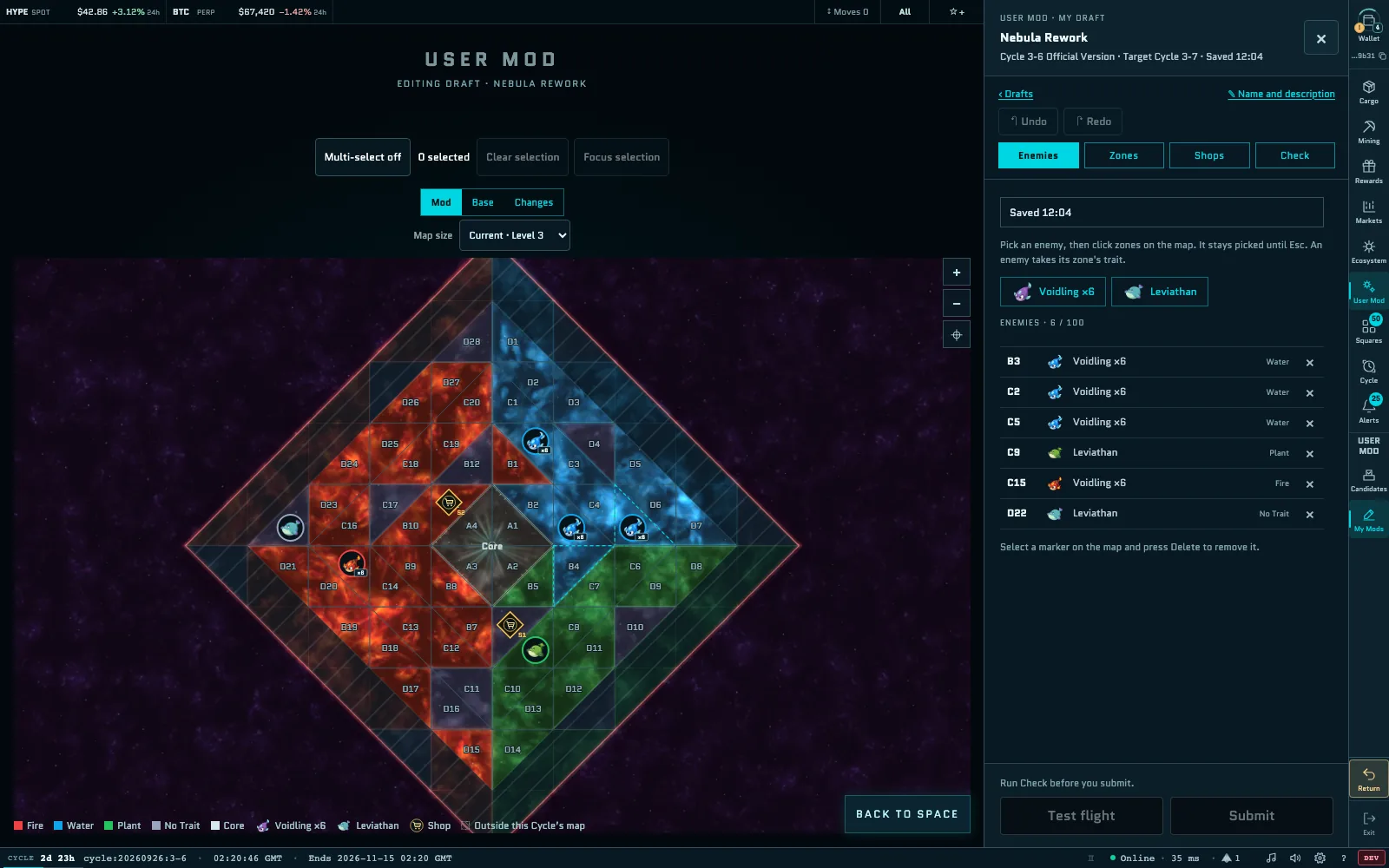
Edit the map on the Enemies, Zones and Shops tabs:
- Enemies: pick an enemy, then click Zones on the map. It stays picked until you press Esc.
- Zones: select one or more Zones (use Multi-select or Shift+click), then pick a trait.
- Shops: place a shop on an empty Zone, add items and set their prices.
Your Draft saves automatically. Use ↶ Undo and ↷ Redo (Ctrl/⌘+Z and Ctrl/⌘+Shift+Z) to step through your changes.
Open the Check tab and select Run Check. Problems must be fixed before you can submit; warnings are fine. Any change to the map clears the result, so run it again before you submit.
Select Test flight to fly your Draft on your own, right there. No other pilots join, purchases are free and nothing is saved. Select End test flight to go back to the editor.
Select Submit. The Submit Candidate window shows the target Cycle, the fee and your AIR balance. Select Pay 50 AIR & Submit and confirm the payment in your wallet.
- Who can submit: pilots who meet any one of these conditions this Cycle: played on the live server on at least one day (UTC), found a Key, or were granted access by the team. The Submit window shows your checklist.
- Limit: 3 candidates per Cycle. My Mods shows your count, such as "Submitted 1 / 3". Drafts are private and don't count until you submit them. You can rename or delete a Draft.
- Fee: submitting currently costs 50 AIR from your wallet. The fee goes to the Vault and isn't refunded.
- Once submitted, a candidate is public and can't be edited or deleted.
If you close the window while a payment is under way, the Draft stays locked. Open it again and select Continue payment or Cancel payment. If your fee went through but the submission didn't, the window says "The fee was already paid." Select Retry registration · no payment to finish it without paying again.
Vote
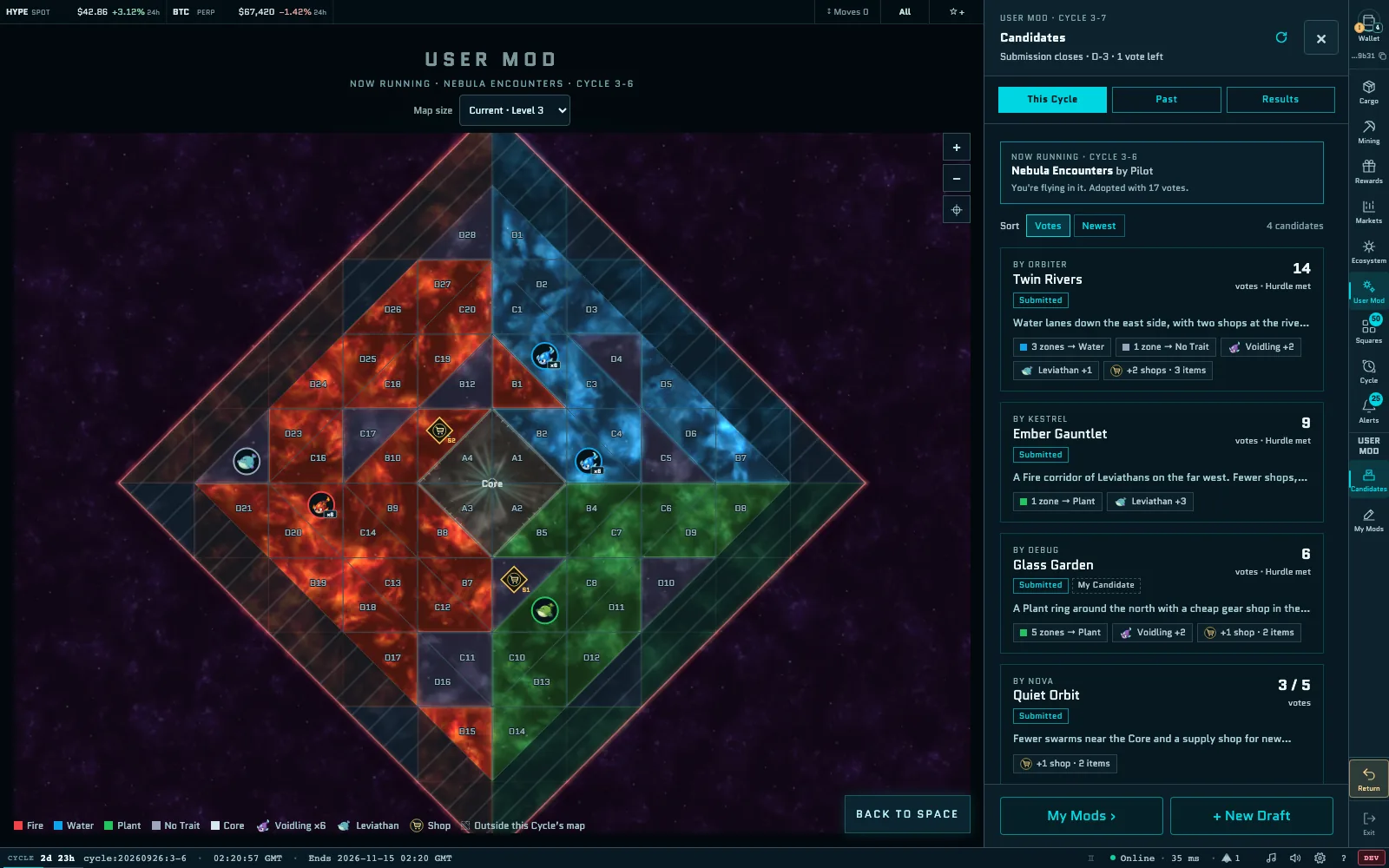
Open Candidates → This Cycle. The top of the panel shows the NOW RUNNING version and whether you've voted: 1 vote left or You voted.
- Sort the candidates by Votes or Newest.
- Select a candidate to show it on the map. Switch between Mod, Base, Changes and Now running to compare it with the current map.
- The selected card has Test flight, Details, which lists its trait, enemy and shop changes, and Vote while voting is open and you haven't voted yet.
Every pilot gets one vote per Cycle. User Mod votes are free and off-chain, so no Key and no transaction are needed. Votes can't be changed, and creators can vote for their own candidates. Past shows the candidates and official versions of earlier Cycles.
Results
When voting closes, the candidate with the most votes becomes the next Cycle's official version. A candidate needs at least 5 votes to qualify. Cards show the count against the hurdle, such as 3 / 5 votes, and then Hurdle met. Ties go to the earlier submission. If no candidate wins, the base version by the Spacebar Team runs.
Candidates → Results shows each Cycle, with the running one marked Live:
- the adopted candidate;
- the Cycle's Total Plays, Unique Players, Total Votes and AIR Fee Revenue;
- the creator reward and its claim status;
- your own record and the candidates that weren't adopted.
Creator rewards
If your candidate is adopted and runs for a Cycle, you earn 10% of the AIR spent in the Global Shop and Mod Shops during that Cycle. Game Ticket sales don't count. The reward is settled about 30 minutes after the Cycle ends, and rewards under 1 AIR aren't paid.
- Open My Mods → Rewards. Your reward shows Settlement in progress until it's settled, then Claimable until its deadline.
- Select Claim, select Claim again in the Claim Reward window, and confirm the transaction in your wallet. You pay only the gas.
Creator rewards can be claimed for 30 days after settlement. Claim Rewards in Results also takes you there. Claimed rewards appear in Wallet → AIR Activity as "Mod Creator Reward".