World & Cycles
The State
The world of Outer Space is a State: a map that represents one chain's ecosystem. Hyperliquid is the first State.
- Zones. The map is a diamond made of triangular Zones. The Core Zone is the four triangles at the center. Rings of Zones (B, C, D and further) spread out from it. The edge of the map can't be crossed.
- A changing map. The map's size is set at the start of every Cycle. It grows by a ring when pilots explore widely and find Keys quickly, and it can shrink by a ring when they barely explore.
- Planets and Mines. Six planets near the center hold games, and eight Mines circle the center of the Core Zone.
Press M for the world map. It shows each Zone's trait, the Zones you've explored, game planets, wormhole points, Keys found this Cycle, Mines you've discovered and your route. Discovery locations on the map are approximate.
Zone traits
Each Zone outside the Core has a trait: Fire, Water, Plant or no trait. Traits are set at the start of every Cycle, at random or by the User Mod chosen for that Cycle.
- Enemies in a Zone share its trait.
- In a Zone with a trait, armor of the same trait shields you. Any other armor leaves you exposed, and your ship loses 2 HP every 10 seconds.
- The Core Zone has no Zone damage, and it repairs your ship.
See Combat & Gear for how traits affect damage.
Cycles and Seasons
| Cycle | One week of play. The bottom bar counts down to its end. |
| Season | Twelve Cycles. Keys are named after their Season and Cycle, such as S3C6 for Season 3, Cycle 6. |
At the start of every Cycle:
- 12 new Keys appear, and Keys left from the last Cycle disappear.
- Zone traits and enemy sites are set again, and the map can grow or shrink.
- Every Mine's shared reserve refills.
- Your Cargo, equipment, supplies, wormholes and Journey stats reset. You start again with a free starter kit: a Common Laser Gun, Bomb, Armor and Booster, already equipped.
If you're flying when the Cycle changes, your reset happens right away. If the next Cycle isn't ready when one ends, the bottom bar shows Updating… until it starts.
Your Game Tickets carry over. Unclaimed rewards don't reset either; each one expires 72 hours after you earn it. Key rewards are the exception: they have to be claimed before their Cycle ends. See AIR & Rewards.
The Cycle view
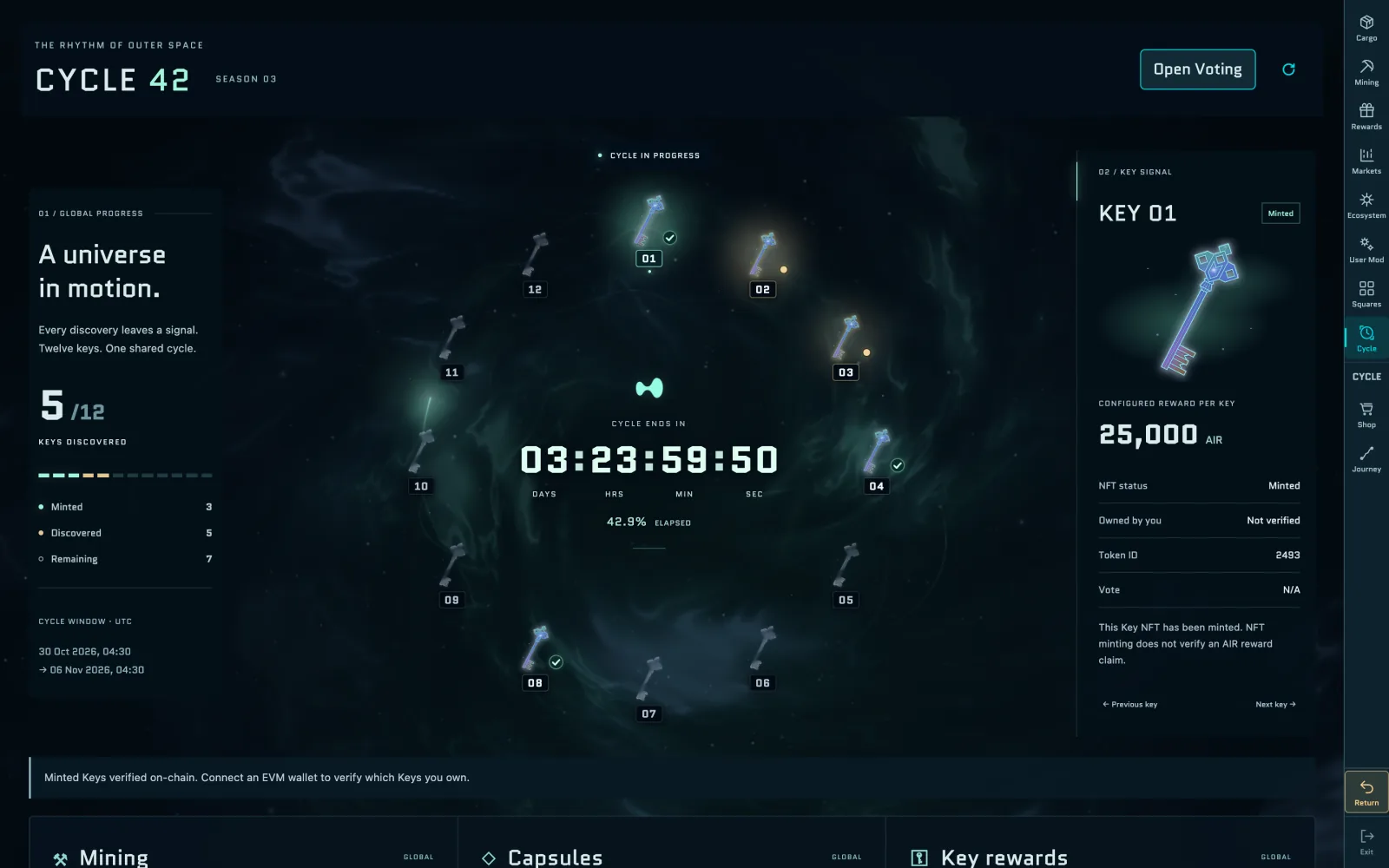
Open Cycle in the menu on the right, or select CYCLE in the bottom bar. The Cycle view fills the screen, titled with the Cycle and Season numbers, and shows:
- Keys: how many of the 12 Keys have been Discovered and Minted, and how many are Remaining. Each Key's slot reads Minted, Found · not minted or Undiscovered. Select a Key for its reward and status, and see who found Keys in Discovery records.
- Mining: the AIR mined this Cycle, the total number of Extractor installs, and how much has been claimed.
- Capsules: how many Capsules have been opened.
- Key rewards: the AIR reward per Key and the configured total for the Cycle's 12 Keys.
- How much of the Cycle has elapsed, with a countdown to its end.
Select Open Voting to vote with your Key. See Voting. While you're in the Cycle view, the menu has Shop, Journey and Return. On phones, the sections become tabs.
Your Journey
Journey in the menu shows your own stats for this Cycle: distance flown, flight time and map vision, the share of the map you've explored. It's in the menu in your Backspace room, on the world map and in the Cycle view. Your Backspace keeps your stats from every Cycle.
Activity feed
The feed at the top right of the screen shows kills and downs of pilots near you, and every Key found in the Cycle. You can change what it shows in Settings → Graphics: Nearby + Keys, Me + Keys or Off.